
SFT Login – Complete Guide to Statement of Financial Transactions Portal
CA Rahul
May 08, 2026
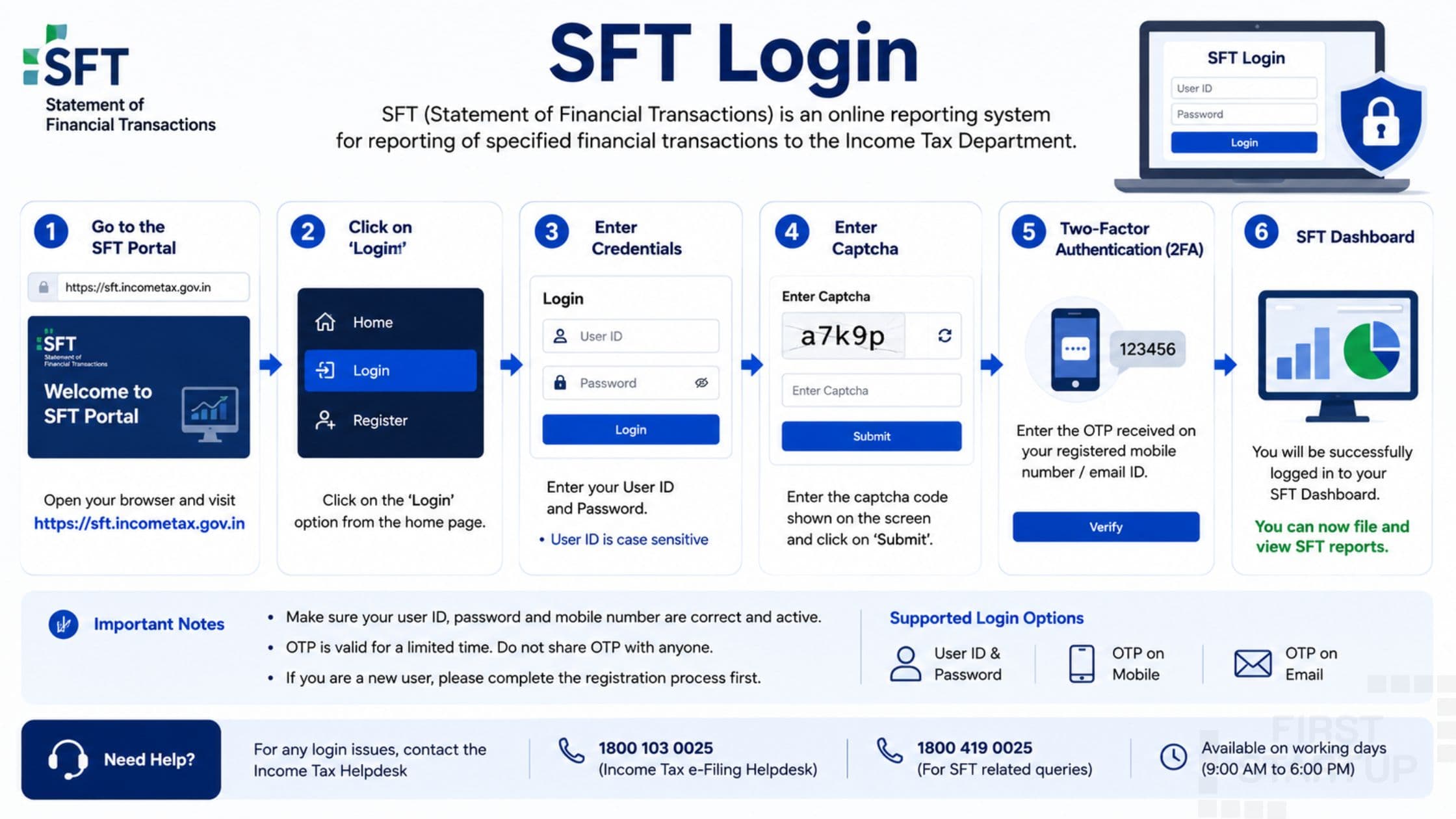
The Income Tax Department of India has introduced several digital compliance systems to improve transparency and tax reporting. One important compliance mechanism is the SFT login portal. Many financial institutions, companies, and reporting entities use the SFT portal for filing high-value financial transaction reports with the Income Tax Department.
If you are searching for information about SFT login, registration process, filing procedure, password reset, or compliance requirements, this detailed guide will help you understand everything in simple language.
What is SFT?
SFT stands for:
Statement of Financial Transactions
It is a reporting system under the Income Tax Act where specified entities must report certain high-value financial transactions to the Income Tax Department.
These transactions help the government track tax compliance and identify undisclosed income or suspicious financial activities.
The SFT login portal is used for filing and managing these reports online.
What is SFT Login?
The SFT login is the online access system provided by the Income Tax Department for reporting entities to:
File SFT returns
Upload transaction details
View filing status
Respond to notices
Manage reporting compliance
Download acknowledgments
Authorized institutions use the SFT portal to comply with mandatory financial reporting requirements.
Who Needs SFT Filing?
Several organizations are required to use the SFT login portal for filing reports.
These include:
Banks
Cooperative Banks
NBFCs
Companies
Mutual Funds
Registrars
Property Registrars
Bond Issuers
Credit Card Companies
Financial Institutions
Entities involved in specified high-value transactions must complete SFT compliance.
Purpose of SFT Reporting
The government introduced SFT reporting to:
Increase tax transparency
Detect tax evasion
Monitor high-value transactions
Improve financial tracking
Ensure accurate income reporting
Using the SFT login system helps the Income Tax Department maintain better financial oversight.
Transactions Covered Under SFT
Different financial transactions must be reported through the SFT portal.
Common Reportable Transactions Include:Cash deposits in bank accounts
Credit card payments
Purchase or sale of property
Mutual fund investments
Fixed deposits
Share transactions
Bond purchases
Foreign currency transactions
Cash deposits in bank accounts
Credit card payments
Purchase or sale of property
Mutual fund investments
Fixed deposits
Share transactions
Bond purchases
Foreign currency transactions
These transactions are reported if they cross specified limits.
How to Access SFT Login Portal
Follow these steps to access the SFT login portal:
Step 1: Visit the Reporting Portal
Open the official Income Tax reporting portal.
Step 2: Click on Login
Select the login option available on the homepage.
Step 3: Enter User Credentials
Provide:
User ID
Password
PAN or TAN details
Step 4: Complete Authentication
Enter OTP or captcha verification if required.
Step 5: Access Dashboard
After successful authentication, the SFT dashboard will open.
Registration Process for SFT Login
Before using the portal, reporting entities must register.
Steps for SFT Registration1. Visit Reporting Portal
Access the official reporting entity registration page.
2. Provide Entity Details
Enter:
PAN
TAN
Organization Name
Contact Details
3. Verify Email and Mobile
Complete OTP verification.
4. Create Login Credentials
Set username and password.
5. Activate Account
After successful registration, login access will be activated.
Documents Required for SFT Registration
Entities may require:
PAN card
TAN registration
Entity incorporation documents
Authorized signatory details
Email ID and mobile number
Proper documentation ensures smooth registration.
How to File SFT Return Online
Using the SFT login, reporting entities can file returns online.
Step-by-Step Filing ProcessStep 1: Login to Portal
Access your account using valid credentials.
Step 2: Select SFT Filing Option
Choose the relevant reporting category.
Step 3: Prepare Statement
Upload transaction data in the prescribed format.
Step 4: Validate Data
Check for errors before submission.
Step 5: Submit Return
File the SFT return online.
Step 6: Download Acknowledgment
Save acknowledgment for future reference.
Types of SFT Reports
Different categories of SFT reports are filed based on transaction nature.
Common Types Include:Banking transactions
Property transactions
Investment transactions
Credit card transactions
Foreign exchange dealings
Banking transactions
Property transactions
Investment transactions
Credit card transactions
Foreign exchange dealings
Entities should file the correct category of statement.
Due Date for SFT Filing
SFT returns are generally filed annually.
Reporting entities must ensure timely filing to avoid penalties.
Late filing may attract:
Monetary penalties
Compliance notices
Legal consequences
Always verify the latest due dates before submission.
Penalty for Non-Filing of SFT
Failure to comply with SFT regulations may result in penalties.
Possible Consequences Include:Daily penalty for delay
Notice from Income Tax Department
Increased scrutiny
Legal action
Daily penalty for delay
Notice from Income Tax Department
Increased scrutiny
Legal action
Timely compliance through the SFT login portal is very important.
Common Errors During SFT Login
Many users face login-related issues.
1. Incorrect Password
Ensure correct username and password entry.
2. Account Lock
Multiple failed attempts may temporarily block access.
3. PAN/TAN Mismatch
Verify registration details carefully.
4. Technical Issues
Server errors may occur during peak filing periods.
How to Reset SFT Login Password
If you forget your password:
Password Reset StepsVisit the login page
Click “Forgot Password”
Enter User ID/PAN/TAN
Verify OTP
Create new password
Visit the login page
Click “Forgot Password”
Enter User ID/PAN/TAN
Verify OTP
Create new password
After reset, you can access the portal again.
Benefits of Online SFT Login System
The online reporting system offers several advantages.
1. Faster Compliance
Entities can file reports digitally.
2. Better Transparency
Financial reporting becomes more structured.
3. Secure Data Submission
Encrypted systems protect sensitive information.
4. Easy Record Management
Users can access previous filings anytime.
Best Practices for SFT Compliance
To avoid penalties and errors:
Maintain Proper Records
Store transaction details securely.
File Before Due Date
Avoid last-minute filing delays.
Verify Uploaded Data
Ensure accurate reporting.
Use Updated Utility Tools
Always use the latest reporting formats.
Frequently Asked Questions (FAQs)What is SFT login?
SFT login is the online portal access system used for filing Statement of Financial Transactions with the Income Tax Department.
Who is required to file SFT?
Banks, NBFCs, companies, registrars, mutual funds, and specified financial institutions must file SFT reports.
What is the purpose of SFT filing?
SFT reporting helps the government track high-value financial transactions and improve tax compliance.
Can SFT returns be revised?
Yes, revised statements can be submitted in case of errors.
What happens if SFT is not filed?
Non-filing may result in penalties, notices, and compliance actions.
Final Words
The SFT login portal plays an important role in India’s tax compliance and financial reporting system. It helps the Income Tax Department monitor specified high-value transactions and improve transparency in the financial sector.
Organizations required to file SFT returns should ensure accurate reporting, timely submission, and proper record maintenance to avoid penalties and legal issues.
With digital filing systems becoming more important, understanding the SFT process is essential for every reporting entity in India.