
Income Tax Login Portal: How to Login, Register and File ITR Online in India
First Startup
Oct 27, 2026
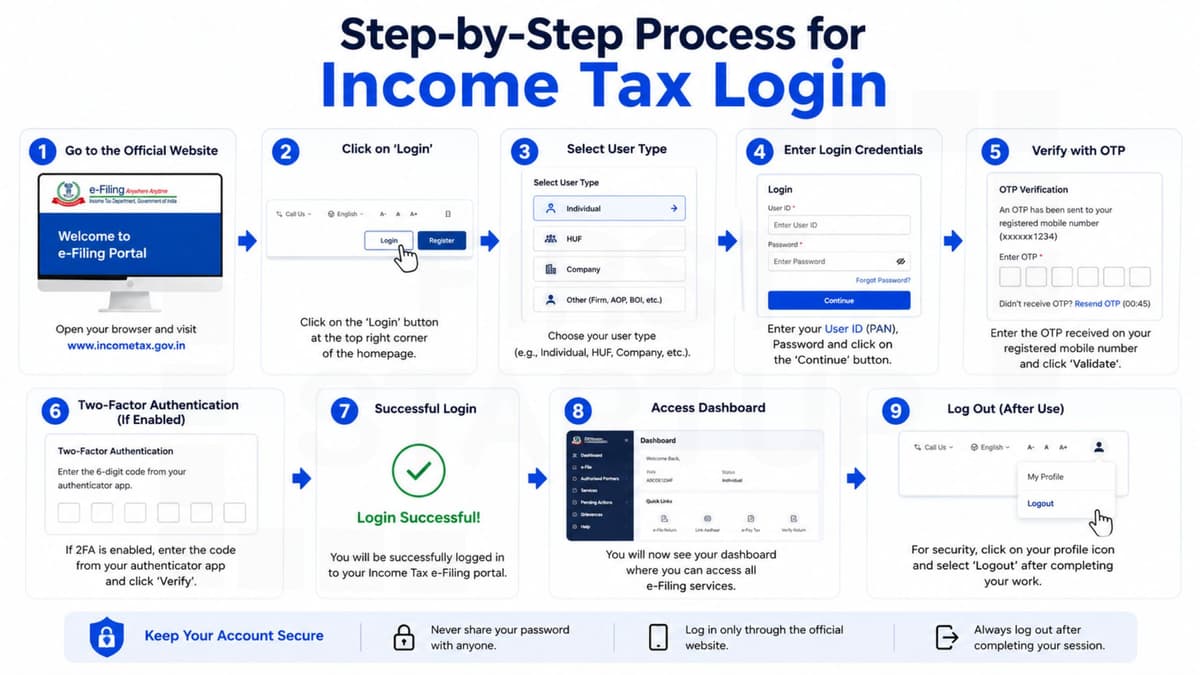
Income Tax Login Portal is an official online platform provided by the Income Tax Department of India that allows taxpayers to manage their tax-related activities conveniently. Whether you want to file an Income Tax Return (ITR), check your refund status, download Form 26AS, view your Annual Information Statement (AIS), or respond to a tax notice, you can access these services online.
The income tax e-filing portal has simplified tax compliance for salaried employees, freelancers, business owners, startups, and companies. By using the income tax portal login, taxpayers can complete many tax-related tasks without visiting an income tax office.
In this guide, we will explain how to access the income tax login portal, register a new account, reset your password, check refund status, and resolve common login issues.
What Is the Income Tax Login Portal?
The Income Tax Login Portal is the official e-filing website of the Income Tax Department of India. It enables individuals and other eligible taxpayers to file returns, view tax records, make payments, and manage their tax compliance online.
The official website is:
Through the income tax india login facility, registered users can access various services, including:
Filing Income Tax Returns online
Checking income tax refund status
Viewing Annual Information Statement (AIS) and Taxpayer Information Summary (TIS)
Downloading Form 26AS
Paying income tax and advance tax
Responding to income tax notices
Verifying filed income tax returns
Viewing previous returns and tax payment records
Updating personal and contact details
The income tax department login portal provides a convenient way to manage tax-related activities from home or the office.
Benefits of Using the Income Tax Portal Login
Using the online income tax login system offers several benefits to taxpayers.
1. Easy Income Tax Return Filing
Taxpayers can file their Income Tax Returns online using the income tax filing login facility. The portal provides options for different categories of taxpayers and applicable ITR forms.
2. Access to Tax Records
After logging in, users can view their filed returns, tax payment information, and other available tax records. This helps maintain accurate financial documentation.
3. Refund Status Tracking
Taxpayers can check their income tax refund status through the e-filing portal. Refund processing depends on the return being processed and other applicable requirements.
4. Online Tax Payments
The portal allows taxpayers to make applicable tax payments electronically through supported payment methods.
5. Convenient Access
The income tax website login facility allows users to access eligible services online without physically visiting an income tax office.
6. Better Tax Compliance
Individuals and businesses can monitor their filings, respond to notices, and manage tax-related responsibilities more efficiently.
How to Login to the Income Tax Portal Online
Follow these steps to access your income tax login account.
Step 1: Visit the Official Website
Open your browser and visit https://www.incometax.gov.in/.
Always verify that you are using the official government website before entering your personal information.
Step 2: Click on Login
On the homepage, select the Login option to open the taxpayer login page.
Step 3: Enter Your User ID
Enter your PAN or another permitted User ID, depending on your registration and taxpayer category.
Step 4: Enter Your Password
Provide the password associated with your registered account.
Step 5: Complete Verification
Follow any additional verification instructions displayed on the portal.
Step 6: Access Your Dashboard
After successful authentication, you can access the services available for your account, including return filing, tax records, and other compliance facilities.
How to Register on the Income Tax Login Portal
If you have not registered on the portal, complete the registration process before using the relevant e-filing services.
Step 1: Open the E-Filing Website
Visit the official Income Tax Department website.
Step 2: Select Register
Click the Register option available on the portal.
Step 3: Choose Your User Category
Select the appropriate category, such as Individual or another applicable taxpayer type.
Step 4: Enter PAN Details
Provide the requested PAN and other identification details.
Step 5: Enter Personal Information
Fill in the required details, such as your name, date of birth, mobile number, and email address, as applicable.
Step 6: Complete Verification
Verify your contact information using the authentication method provided by the portal.
Step 7: Create Your Password
Set a strong password and complete the registration process by following the instructions displayed on the website.
Once registration is complete, you can use your credentials to access the income tax login portal.
Documents and Details Required for Registration
Before beginning the registration process, keep the following information available, as applicable:
PAN details
Aadhaar details, where required
Registered mobile number
Email address
Basic personal or entity information
Bank account details for relevant tax services
The exact requirements may vary depending on your taxpayer category and the service you want to use. Bank details may be needed for refund-related services but are not necessarily required for every registration.
Services Available After Income Tax Login
After accessing the income tax account login dashboard, taxpayers can use several important services.
File Income Tax Returns
The portal allows eligible taxpayers to file their ITR using the applicable return form and filing method.
Check Income Tax Refund Status
Taxpayers can view refund-related information and track the progress of their refund where the service is available.
Download Form 26AS
Form 26AS provides relevant tax credit information. It can help taxpayers reconcile tax deducted or collected and other reported tax details.
View AIS and TIS
The Annual Information Statement and Taxpayer Information Summary provide information about specified financial transactions and tax-related data reported to the Income Tax Department.
Pay Income Tax Online
Users can access the e-Pay Tax facility to make applicable tax payments.
Respond to Income Tax Notices
The portal provides facilities for responding to notices and completing other required actions, depending on the notice type.
Verify Your Income Tax Return
After filing a return, taxpayers must complete the applicable verification process within the prescribed time limit.
How to Reset Your Income Tax Login Password
If you forget your password, you can use the password recovery facility.
Visit the official income tax e-filing website.
Click Login.
Select the Forgot Password option.
Enter your User ID and follow the instructions.
Complete identity verification using one of the methods offered by the portal.
Set a new password and confirm the changes.
Available verification methods may depend on your account type and the options currently provided by the Income Tax Department.
Never share your password or OTP with anyone claiming to provide refund or tax filing assistance.
Common Income Tax Login Problems and Solutions
Taxpayers may sometimes experience difficulties while accessing the portal. The following solutions can help resolve common issues.
1. Incorrect Password
Check that you have entered the correct password. If necessary, use the password recovery option.
2. User ID or PAN Issues
Ensure that you have entered the correct User ID. If your account is not registered, complete the registration process first.
3. OTP Not Received
Check your mobile network, registered contact details, and message inbox. Wait briefly before requesting another OTP.
4. Website Not Loading
The portal may experience temporary technical problems or heavy traffic. Try refreshing the page, clearing your browser cache, or accessing the website later.
5. Account Access Problems
If repeated login attempts fail, follow the instructions displayed on the portal or use the official support facility.
6. Verification Errors
Confirm that the information you provide matches the details associated with your account and follow the portal's verification instructions.
Tips for Secure Income Tax Portal Login
Protecting your tax account is essential because it contains sensitive financial information.
Follow these security practices:
Use a strong and unique password.
Never share your OTP or login credentials.
Access the portal through the official government website.
Avoid logging in on public or untrusted devices.
Do not click suspicious tax refund messages or links.
Keep your registered mobile number and email address updated.
Log out after using a shared computer.
Check the authenticity of communications claiming to be from the Income Tax Department.
These precautions can help reduce the risk of unauthorised access and online fraud.
Who Should Use the Income Tax Login Portal?
The income tax login portal is useful for different categories of taxpayers, including:
Salaried employees
Freelancers and consultants
Self-employed professionals
Small business owners
Startups and entrepreneurs
Private limited companies
LLPs and partnership firms
Trusts and other eligible entities
Non-resident Indians, where applicable
The services available depend on the taxpayer's category, registration status, and applicable tax requirements.
Why Is the Income Tax Login Portal Important for Businesses?
Businesses need to manage income tax compliance, maintain financial records, and respond to tax-related communications.
The income tax department login portal can help eligible businesses with:
Filing company income tax returns
Making applicable income tax payments
Viewing tax-related information
Responding to notices and communications
Accessing available tax records
Completing applicable verification procedures
Businesses should also maintain their accounting records and review their tax obligations regularly. TDS return filing and other compliance activities may involve separate forms, procedures, or services within the relevant government portals.
Frequently Asked Questions About Income Tax Login Portal
1. What is the Income Tax Login Portal?
The Income Tax Login Portal is the official online platform of the Income Tax Department of India. It allows registered users to file income tax returns, check refund information, view tax records, make payments, and access other tax services.
2. How can I access the income tax portal login?
Visit https://www.incometax.gov.in/, click Login, enter your User ID and password, and complete any additional verification requested by the portal.
3. Is PAN required for income tax login?
PAN is commonly used as the User ID for individual taxpayers. Other taxpayer categories may use the identification details applicable to their accounts.
4. How can I register on the income tax e-filing portal?
Visit the official website, select Register, choose your taxpayer category, provide the requested details, complete verification, and follow the instructions to create your account.
5. Can I check my income tax refund after login?
Yes. You can access the applicable refund status service through the e-filing portal to review available information about your refund.
6. How can I reset my income tax login password?
Select Forgot Password on the login page and follow the identity verification and password recovery instructions provided by the portal.
7. Can I access the income tax login portal on my mobile phone?
Yes. The official e-filing website can be accessed through a compatible mobile browser. Some services may also be available through official mobile applications.
8. Is the income tax login portal safe?
The official portal provides authentication and security measures. However, users should protect their credentials, avoid suspicious links, and never share OTPs or passwords.
9. Why is my income tax website login not working?
Common causes include incorrect credentials, an unregistered account, verification errors, browser problems, or temporary technical issues. Check your details and follow the recovery instructions on the official website.
10. How can I download Form 26AS?
Log in to the portal and navigate to the applicable tax credit or Form 26AS service. Follow the displayed instructions to access the statement.
11. Can companies use the income tax department login portal?
Yes. Companies and other eligible entities can register or access their accounts to complete relevant income tax filing and compliance activities.
12. What is the difference between ITR login and income tax portal login?
Both terms commonly refer to accessing the Income Tax Department's e-filing portal. The exact service you need may differ depending on whether you want to file a return, view tax records, or complete another tax-related task.
13. Can I update my mobile number after logging in?
You can update eligible contact information through the profile or account management options available on the portal, subject to the applicable verification process.
14. Is Aadhaar-PAN linking required for income tax services?
Aadhaar-PAN linking is generally required for taxpayers covered by the applicable rules, subject to statutory exemptions. Check your current status and eligibility on the official portal.
15. Can I file my income tax return without visiting an income tax office?
Yes. Eligible taxpayers can file their returns online and complete the applicable verification process through the e-filing system.
Final Words
The Income Tax Login Portal makes it easier for individuals, professionals, and businesses to manage their tax-related activities online. From filing Income Tax Returns and checking refund status to viewing tax statements and responding to notices, the portal provides access to a wide range of services.
Understanding the income tax portal login process can help you save time, maintain accurate records, and meet your tax obligations more efficiently.
For accurate information, always use the official website: https://www.incometax.gov.in/. If you need professional assistance with ITR filing, tax documentation, or business compliance, consider consulting a qualified tax professional.