
TDS Online Payment: Step-by-Step Guide to Pay TDS Online in India
First Startup
Oct 20, 2026
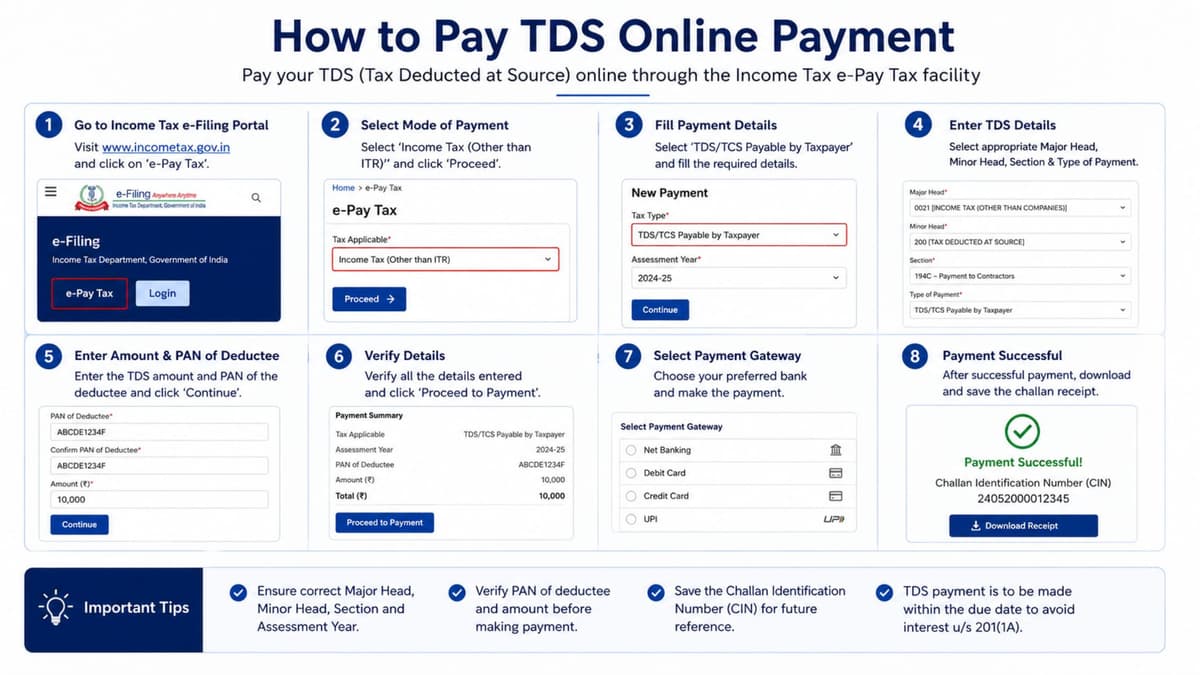
The Income Tax Department provides an online e-Pay Tax facility that allows deductors to generate challans, deposit TDS electronically, and maintain payment records.
In this blog, we explain how to make a TDS online payment in India, the challans used for payment, applicable due dates, payment methods, common mistakes, and frequently asked questions.
What Is TDS Online Payment?
TDS online payment refers to depositing tax deducted from a payment with the Government of India through the applicable income tax payment facility.
When a person or business makes certain payments, the law may require the payer to deduct tax before paying the recipient. The deducted amount must then be deposited with the government within the applicable due date.
For example, if a company pays a consultant ₹50,000 and deducts ₹5,000 as TDS under an applicable provision, the company pays ₹45,000 to the consultant and deposits ₹5,000 with the government, subject to the applicable rules and rates.
The actual TDS rate and deduction requirement depend on the nature of the payment, the recipient's status, and the applicable tax provisions.
Who Needs to Make a TDS Online Payment?
TDS online payment may be required for the following categories, depending on the applicable provisions:
Companies and private limited companies: For TDS deducted on qualifying business payments and employee salaries.
Limited Liability Partnerships (LLPs): For applicable payments to professionals, contractors, employees, and other recipients.
Employers: For tax deducted from salaries.
Businesses and firms: For qualifying rent, interest, commission, and contractual payments.
Government departments: For applicable tax deduction obligations.
Individuals and other taxpayers: For specific transactions where TDS provisions apply, including certain property or rent transactions.
Not every payment requires TDS deduction. Deductors should check the applicable threshold, rate, recipient category, and statutory requirements before depositing tax.
How to Make TDS Online Payment in India
Follow these steps to pay TDS online.
Step 1: Visit the Income Tax Portal
Open the official Income Tax Department e-filing portal and select the e-Pay Tax facility. You may need to log in or use the available pre-login payment option, depending on the transaction.
Step 2: Enter Your TAN Details
For regular TDS/TCS payments, provide the required Tax Deduction and Collection Account Number (TAN) and mobile number. Complete OTP verification if requested.
Step 3: Select the Applicable Payment Option
Choose the applicable Income Tax Act based on the tax period. Select the TDS/TCS payment option for a regular TDS deposit. For outstanding demands or specified transactions, select the appropriate payment category.
Step 4: Fill in the TDS Challan Details
Enter the required information, including:
Deductor and deductee category
Applicable tax period
Relevant section or nature of payment
TDS amount
Interest, fees, or other applicable amounts
Review all details carefully before proceeding.
Step 5: Select a Payment Method
Choose an available payment method, such as net banking, debit card, UPI, or another supported payment option. The available methods depend on the selected payment route and bank.
Step 6: Complete the Payment
Complete the payment through the selected bank or payment gateway. Check the payment status and save the challan receipt, Challan Reference Number (CRN), or other applicable payment reference for future records.
Which Challan Is Used for TDS Online Payment?
The applicable challan depends on the tax period and type of transaction.
Challan or form | Purpose |
|---|---|
ITNS 281 | Applicable TDS/TCS payments under the Income-tax Act, 1961 |
ITNS 281N | Applicable TDS/TCS payments under the Income-tax Act, 2025, for Tax Year 2026–27 onwards |
Form 141 | Challan-cum-statement for specified transactions under the applicable provisions of the Income-tax Act, 2025 |
For tax periods governed by the Income-tax Act, 1961, use the applicable legacy payment process. For Tax Year 2026–27 onwards, verify the requirements under the Income-tax Act, 2025.
Always select the correct Act, tax period, and payment category before generating the challan.
Documents and Details Required for TDS Online Payment
Before starting the payment process, keep the following information ready:
Valid TAN of the deductor, where required
Registered mobile number for OTP verification
Applicable tax period or assessment year
Deductee category and residential status
Relevant section or nature of payment
TDS amount and applicable additional amounts
Bank or payment facility details
Previous challan or demand details, if applicable
Entering accurate information helps avoid payment allocation errors and complications during TDS return filing.
TDS Online Payment Due Date
The due date for depositing TDS depends on the type of deduction, applicable provisions, and circumstances of the payment.
For many routine non-government deductors, TDS is generally deposited by the 7th day of the following month. Special rules may apply to deductions made in March, specified property or rent transactions, and other categories.
Payment category | What to check |
|---|---|
Monthly TDS deposits | Applicable monthly deposit deadline |
Salary TDS | Applicable salary-related deposit rules |
Property transactions | Relevant challan-cum-statement requirements |
Rent or specified individual transactions | Applicable transaction-specific provisions |
Late deposit | Applicable interest, fees, and other consequences |
Do not rely on a general due date for every transaction. Confirm the deadline under the applicable law and the specific nature of the deduction.
How to Check TDS Online Payment Status
After making a TDS payment, verify that the transaction was completed successfully.
Open the Income Tax e-filing portal.
Navigate to the e-Pay Tax service.
Log in if required.
Open the available payment history or challan status facility.
Locate the relevant payment using the available reference details.
Confirm the payment status and save the receipt or challan details.
If money has been debited but the payment status is pending or unsuccessful, check the portal and bank transaction status before attempting another payment. This helps reduce the risk of duplicate payments.
Common Mistakes to Avoid During TDS Online Payment
Avoid these common errors when making a TDS deposit:
Incorrect TAN: Enter the correct TAN associated with the deductor.
Wrong tax period: Select the appropriate assessment year or tax year based on the applicable Act.
Incorrect payment category: Choose the correct deductee type and section.
Wrong tax amount: Reconcile the challan with your accounting records before payment.
Duplicate payment: Verify the earlier transaction status before paying again.
Missing records: Save the challan, payment reference, and bank confirmation.
Delayed deposit: Track statutory deadlines to reduce the risk of interest or other consequences.
For businesses, reconciling challan details with TDS returns and accounting records is an important part of regular tax compliance.
Benefits of TDS Online Payment
Online TDS payment offers several practical benefits to taxpayers and businesses.
1. Convenient tax payment: Payments can be initiated online without visiting a tax office.
2. Digital records: Challan receipts and payment references support bookkeeping and tax reconciliation.
3. Multiple payment options: Eligible taxpayers can choose from the payment modes available for their transactions.
4. Easier compliance management: Businesses can maintain payment records alongside their TDS returns and monthly accounting.
5. Better tracking: Payment history and challan status facilities help businesses review transactions and resolve payment issues.
Frequently Asked Questions (FAQs)
1. How can I make a TDS online payment?
Open the Income Tax e-filing portal, select e-Pay Tax, verify your details, choose the applicable Act and payment category, enter the required challan information, and complete payment through an available payment method.
2. Which website is used for TDS online payment?
The Income Tax Department's e-filing portal provides the e-Pay Tax facility for applicable TDS/TCS payments.
3. Can I pay TDS online without logging in?
Yes, eligible taxpayers can use the pre-login e-Pay Tax facility. You may need to provide your TAN, mobile number, and OTP. Some services require login.
4. What is the challan number for TDS payment?
ITNS 281 is used for applicable TDS/TCS payments under the Income-tax Act, 1961. ITNS 281N applies to relevant payments under the Income-tax Act, 2025, for Tax Year 2026–27 onwards.
5. Can I pay TDS through UPI?
UPI may be available through eligible e-Pay Tax payment routes. The available options depend on the selected bank or payment gateway.
6. How do I download a TDS challan receipt?
Open the e-Pay Tax payment history or the applicable challan status facility, locate the transaction, and download the receipt or payment details where available.
7. What happens if I deposit TDS late?
Late deposit may result in interest and other consequences under the applicable tax provisions. The exact amount and treatment depend on the circumstances.
8. Is TAN required for TDS online payment?
TAN is generally required for regular TDS deposits made by a deductor. Certain specified transactions follow a different challan-cum-statement process and may have separate identification requirements.
9. Can I make a TDS payment for a previous year?
Yes, where the relevant payment facility permits it. Select the correct applicable Act, tax period, and payment category, particularly when dealing with earlier assessment years or outstanding demands.
10. What should I do if my TDS payment fails?
Check your bank transaction status and the payment status on the tax portal. If the amount has been debited, verify whether the payment is pending or successful before attempting another transaction.
Conclusion
TDS online payment helps businesses and other deductors deposit tax electronically and maintain records for tax compliance. By selecting the correct challan, entering accurate details, paying within the applicable deadline, and retaining the receipt, taxpayers can make the process more manageable.
Always verify the applicable tax law and payment period before submitting a challan, especially when choosing between ITNS 281 and ITNS 281N. Regular payment tracking and accurate recordkeeping can also help businesses manage their tax compliance more efficiently.