
Password Types for Various Income Tax Documents in India: Complete Guide
First Startup
Oct 20, 2026
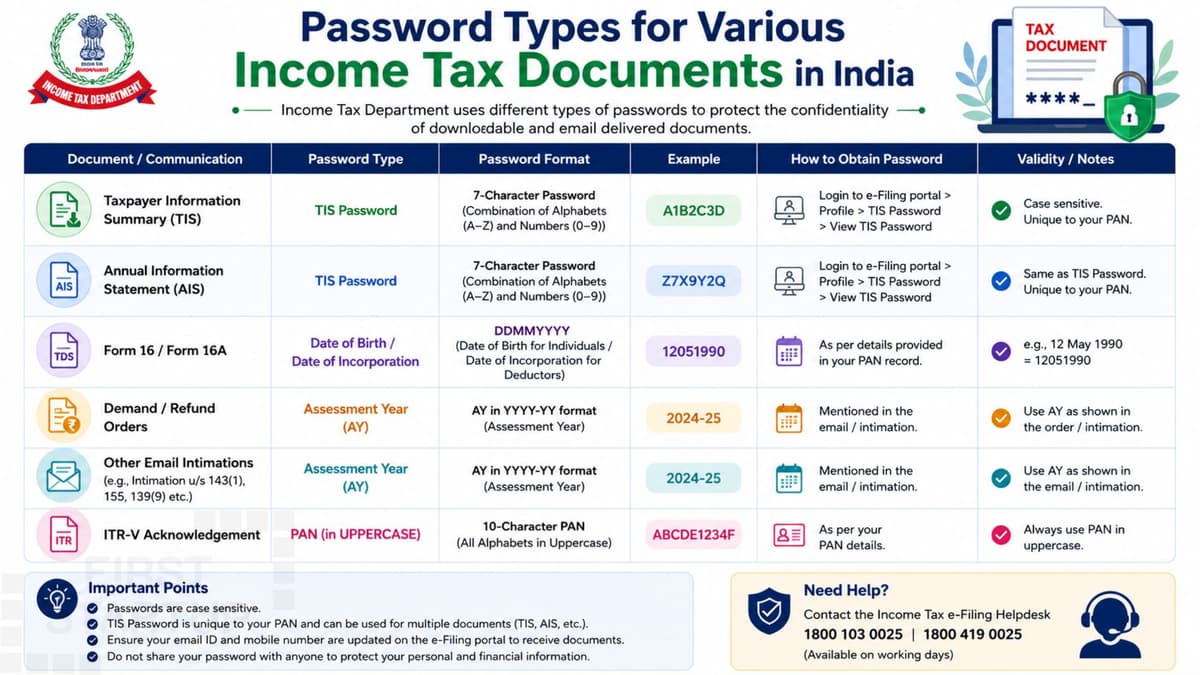
When filing an Income Tax Return (ITR) in India, taxpayers often need to download and open password-protected PDF documents. These may include Form 26AS, Annual Information Statement (AIS), Taxpayer Information Summary (TIS), ITR-V acknowledgement, income tax notices, and TDS certificates.
However, each document may follow a different password format. Some documents use your date of birth, while others use your PAN and date of birth or a password specified by the issuing authority.
In this guide, we explain the password types for various Income Tax documents in India, including common password formats, examples, and solutions for opening password-protected files.
What Are Password-Protected Income Tax Documents?
Password-protected Income Tax documents are digital files secured to protect confidential taxpayer information. They may contain personal identification details, income information, tax deductions, refund details, or other financial records.
The password depends on the document and the platform from which it was downloaded. Therefore, you should always check the instructions provided by the Income Tax Department, TRACES, your employer, or the issuing institution.
Password Types for Various Income Tax Documents in India
The following table summarizes common password formats. These are general guidelines; verify the instructions accompanying your particular file.
| Income Tax Document | Common Password Format |
|---|---|
| Form 26AS downloaded from TRACES | Date of birth in DDMMYYYY format |
| Annual Information Statement (AIS) PDF | PAN in lowercase + date of birth or date of incorporation in DDMMYYYY format |
| Taxpayer Information Summary (TIS) | Follow the instructions for the downloaded file; the password may depend on the download format |
| Form 16 | Depends on the employer or issuing platform |
| Form 16A | Depends on the deductor or issuing platform |
| ITR-V acknowledgement | Depends on the file and issuing platform; check the download instructions |
| Income Tax intimation or notice | Follow the password instructions included with the communication |
| Other TDS certificates | Depends on the certificate type and issuing platform |
The password formats above are not universal for every version of a document. For example, the official Income Tax Department's AIS guidance specifies a PAN-and-date-of-birth format for an AIS PDF. TRACES separately confirms the date-of-birth format for Form 26AS. https://www.incometaxindia.gov.in/annual-information-statement https://traces61contents.tdscpc.gov.in/en/faq-taxpayer-26AS-general.html
1. Form 26AS Password
Form 26AS is a tax credit statement that helps taxpayers verify tax deducted at source (TDS), tax collected at source (TCS), and other tax-related details available in the statement.
Common password format: Date of birth in DDMMYYYY format.
Example:
Date of birth: 15 August 1995
Password:
15081995
Enter the date without spaces or slashes. If the password does not work, verify the date of birth recorded against your PAN and check the download instructions.
2. AIS PDF Password
The Annual Information Statement (AIS) contains information reported to the Income Tax Department about a taxpayer's financial activities. It may include TDS/TCS information, specified financial transactions, tax payments, and refund or demand information.
Password format for AIS PDF: PAN in lowercase followed by date of birth in DDMMYYYY format for an individual taxpayer. For a non-individual taxpayer, use the date of incorporation or formation where specified.
Example:
PAN:
ABCDE1234FDate of birth: 15 August 1995
Password:
abcde1234f15081995
Do not add spaces between the PAN and date. The official AIS guidance describes this format for protected PDF downloads. https://www.incometaxindia.gov.in/annual-information-statement
3. TIS Password
The Taxpayer Information Summary (TIS) presents a summarized view of information available in AIS, helping taxpayers review information relevant to their income tax return.
TIS may be accessed through the Income Tax e-Filing portal as part of AIS-related services. Do not assume that every TIS download has the same password as an AIS PDF. Check the file's download instructions and the format provided by the portal.
4. Form 16 Password
Form 16 is a salary TDS certificate issued by an employer to an employee. It generally contains salary details, deductions considered by the employer, and tax deducted and deposited.
There is no single password format that applies to every Form 16 PDF. The password depends on how the employer or platform generated the document.
If you receive Form 16 by email, check the accompanying message for the password instructions. If the document was generated through a payroll or tax platform, follow that platform's guidance.
5. Form 16A Password
Form 16A is a TDS certificate for income other than salary, such as certain interest or professional-fee payments.
The password depends on the issuing deductor or platform. If you downloaded the certificate from TRACES or received it from a bank or other deductor, follow the relevant download instructions rather than assuming that the Form 26AS password will work.
6. ITR-V Acknowledgement Password
ITR-V is the acknowledgement associated with an income tax return filed electronically in circumstances where an acknowledgement is generated for verification.
The password format can depend on the file and the instructions provided by the Income Tax e-Filing portal. Check the download page or accompanying communication before trying a password format found on an unrelated website.
Also remember that downloading an acknowledgement and completing any required return-verification step are separate matters. Follow the verification instructions applicable to your return.
7. Income Tax Intimation and Notice Passwords
Income Tax intimation PDFs and notices may contain information about return processing, tax calculations, refunds, demands, or other proceedings.
Their password formats can vary according to the document and the issuing system. Read the accompanying email or portal instructions carefully. Do not assume that an AIS, Form 26AS, or ITR-V password will work for every notice.
For security, access notices through the official Income Tax e-Filing portal whenever possible.
How to Open a Password-Protected Income Tax PDF
Follow these steps to open a protected document:
Download the PDF from the official portal or the trusted issuing platform.
Read the email or download instructions to identify the required password format.
Check whether the format requires uppercase or lowercase letters.
Enter the required date in the specified order, such as DDMMYYYY.
Remove spaces or punctuation if the instructions require a continuous password.
Open the file using a trusted PDF reader.
For example, if the AIS instructions require a lowercase PAN followed by a date of birth, enter the complete combination without spaces.
Common Reasons an Income Tax PDF Password Does Not Work
If your PDF does not open, check the following:
Incorrect date format: Use DDMMYYYY if that is the format specified.
Wrong PAN capitalization: AIS PDF passwords use lowercase PAN letters in the documented format.
Extra spaces: Remove spaces where the password requires a continuous combination.
Incorrect personal details: Verify your date of birth or incorporation date against the relevant records.
Wrong document format: A password for one statement may not work for another.
Outdated instructions: The issuing platform may have changed its procedure.
Incomplete download: Download the file again from the official source if it appears damaged.
Avoid repeatedly guessing passwords. Instead, check the document-specific instructions or contact the issuing authority.
Important Security Tips for Income Tax Documents
Income Tax documents may contain confidential financial and identity information. Follow these precautions:
Download documents only from official or trusted sources.
Do not share your PAN, date of birth, portal password, or OTP unnecessarily.
Avoid uploading tax documents to unknown online PDF-unlocking websites.
Keep downloaded files in a secure folder.
Use a trusted PDF reader and keep your devices updated.
Never confuse a PDF-opening password with your Income Tax e-Filing account password.
The Income Tax Department also warns taxpayers not to disclose passwords or similar access information for banking and other financial accounts in response to suspicious emails. https://www.incometax.gov.in/
Conclusion
Understanding the password types for various Income Tax documents in India helps taxpayers access important files without unnecessary delays. Form 26AS commonly uses the taxpayer's date of birth in DDMMYYYY format, while an AIS PDF uses the PAN in lowercase followed by the date of birth or the applicable incorporation date.
For Form 16, Form 16A, TIS, ITR-V, and income tax notices, the correct password may depend on the issuing platform and document-specific instructions. Always verify the required format before opening the file, and protect your tax documents to keep sensitive information secure.
For the most reliable guidance, refer to the official Income Tax Department and TRACES websites.